Install.
A single installer, around 50–150 MB. No internet connection required. No cloud dependency. No changes to your POS, your CRM, or your core application.

Duo Input is patented software that enables true simultaneous touch input across multiple displays. No cursor conflicts, no interruptions, no operating-system workarounds. Two people can work on two screens at the same time, and it just works.
Display 1
Name confirmation
Signature
Display 2
Signature
The problem
Most operating systems were built around a single active cursor. For a single user at a desk, that's fine. For a checkout, a hotel front desk, or a bank counter where a staff member and a customer are supposed to work on two screens at the same time, it falls apart immediately.
What actually happens today:
The workarounds all exist because the underlying problem has never been solved at the OS level: lock one screen, build a separate device, or route everything through the staff side. Duo Input solves it.
The solution
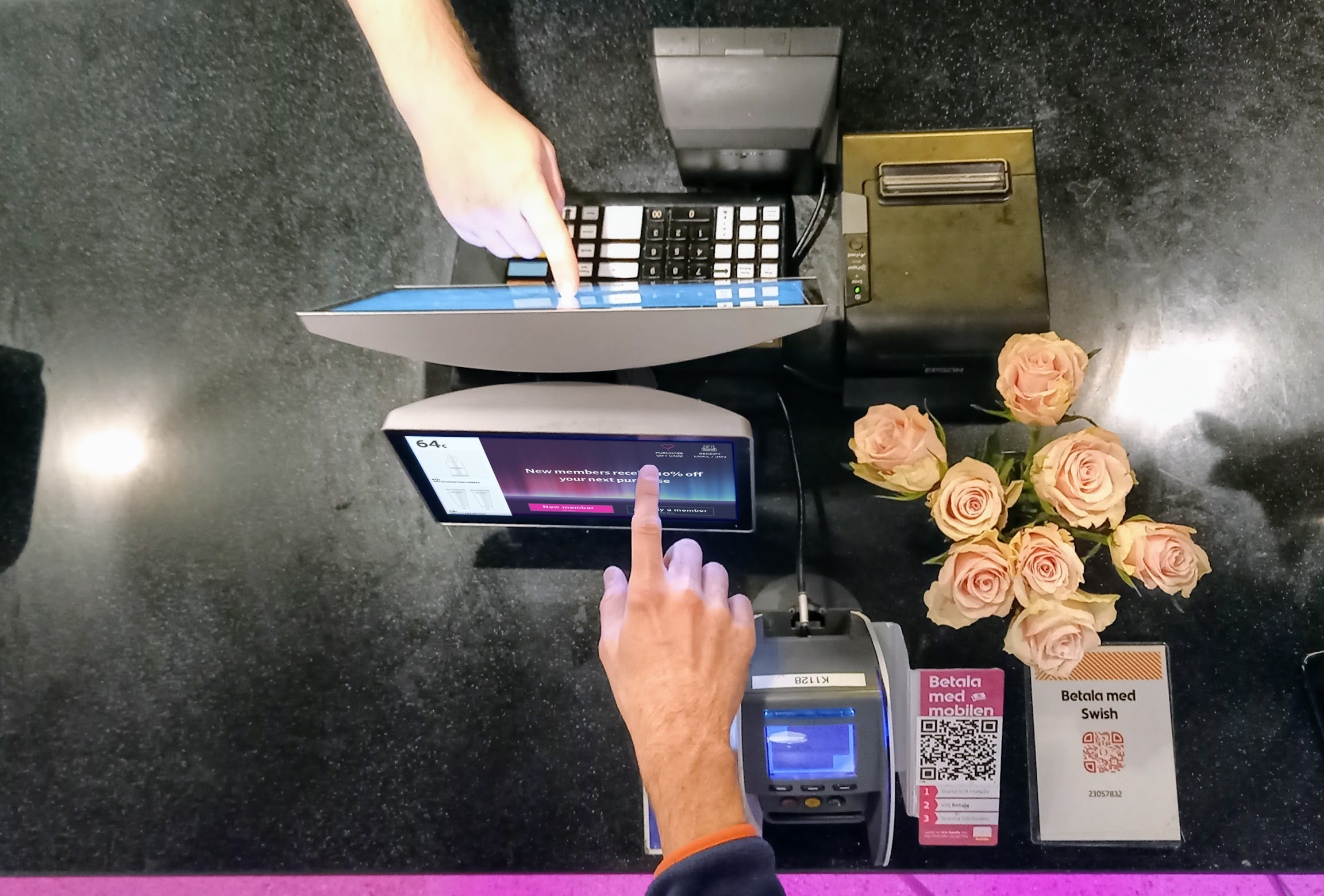
Duo Input™ is software that sits between your displays and your application, and it does one thing exceptionally well: it lets two touch inputs happen at the same time, on two different screens, without either one interrupting the other. The cashier keeps processing the transaction. The customer signs, types, confirms. Neither one waits for the other.
It's not a UI trick or a polling workaround. It's patented, it's deterministic, and it runs on the operating systems you already have.
How it works
A single installer, around 50–150 MB. No internet connection required. No cloud dependency. No changes to your POS, your CRM, or your core application.
Point Duo Input at the two screens you want to pair, such as a cashier terminal and a customer-facing display, two monitors at a bank counter, or a reception screen and a Wacom guest signature pad. It handles the rest.
Your application sees clean, parallel input streams from both screens. No custom cursor management. No focus-juggling logic. You build the flow; Duo Input makes it possible.
Key benefits
One user keeps processing while the second user interacts with the second screen. Independent, parallel, no contention.
Two-screen form filling with shared progress visibility. The staff member sees what the customer is entering, in real time, on their own screen.
A customer signs on their display. The staff member confirms all the fields are correct. Same moment, same meeting, no handoff.
The kind of CRM and KYC data that always gets lost at the counter, captured cleanly by the person it belongs to.
No internet connection required. Duo Input runs entirely on-device, which matters for compliance and latency.
Windows 10, Windows 11, and selected Linux distributions. No kernel hacks, no fragile workarounds, no “it worked until the last update.”
Who it's for
Duo Input was built for a specific problem in the modern checkout, but the problem shows up everywhere two-user, two-screen workflows do.
Retail. Cashier and customer at the till. Email capture, loyalty signup, and consent collections without breaking the cashier's rhythm.
Hotels. Reception and guest at check-in. Voucher and offer selections, and marketing consent on the guest's screen, while the receptionist finalizes the booking.
Banks. Advisor and customer at the bank office. Form-filling, and digital signatures with both parties looking at and working on the same digital form simultaneously.
If your customer touch point has two screens today and one of them is mostly ignored, that's the use case.
Use case spotlight: digital signatures
Digital signatures at a counter are awkward for a reason. Either the customer has to turn the staff member's screen around, or the staff member has to stop what they're doing and hand over control, or there's a second device bolted to the counter for this one task.
With Duo Input, the customer signs on the customer-facing display while the staff member continues working on theirs. Both inputs are live. Both are captured. The transaction closes in one motion instead of three.
Technical specifications
Installer size~50–150 MB
Disk space after installation~100–250 MB (depending on configuration)
Runtime memory usage~50–150 MB
Internet connectionNot required
Supported operating systemsWindows 10 (32-bit and 64-bit), Windows 11 (64-bit), Linux (selected distributions)
Display supportAny two touch displays
IntegrationWorks alongside existing POS, CRM, and line-of-business applications
LicensingPer-device, with volume pricing for multi-site rollouts
A small footprint matters. Large enterprise hardware is almost never top-spec, and the last thing you need is another background service eating memory. Duo Input is built to be invisible.
Patent and IP
Duo Input is patent-protected technology. Simultaneous multi-display input isn't something we stumbled into; it's something we solved, filed, and defended. For customers, that means two things: the capability is durable, and the investment you make building workflows on top of it isn't going to be commoditized out from under you.

No. Duo Input sits between your displays and your application. Most customers deploy it without touching their POS at all.
Yes. Any standard touch display supported by Windows or Linux. No proprietary hardware required, though ID24's D|2 displays are purpose-built for this class of deployment.
No. Duo Input runs entirely on-device. That matters for compliance, for latency, and for the times when the store network drops.
Yes. Duo Input is deployed today across multi-site retail networks and supported by ID24's rollout methodology. Central licensing, remote install and standard imaging are all handled.
Two computers means two sessions, two sets of state, and two places to keep in sync. Duo Input gives you one application, one transaction, and two live input streams. The workflow stays whole.
Yes. Get in touch and we'll route you to the right technical contact.
A live demo is faster than reading about it. Bring your use case, from checkout and check-in to counter service or a bank office, and we'll show you Duo Input handling it.
